
Free corporate event invitations that look professional
Invite clients, partners and teams to launches, galas, conferences and holiday parties. Clean design, online RSVP and a QR code that makes check-in and sharing easy.
Free to design and preview. Pay once only when you publish.
What are digital corporate event invitations?
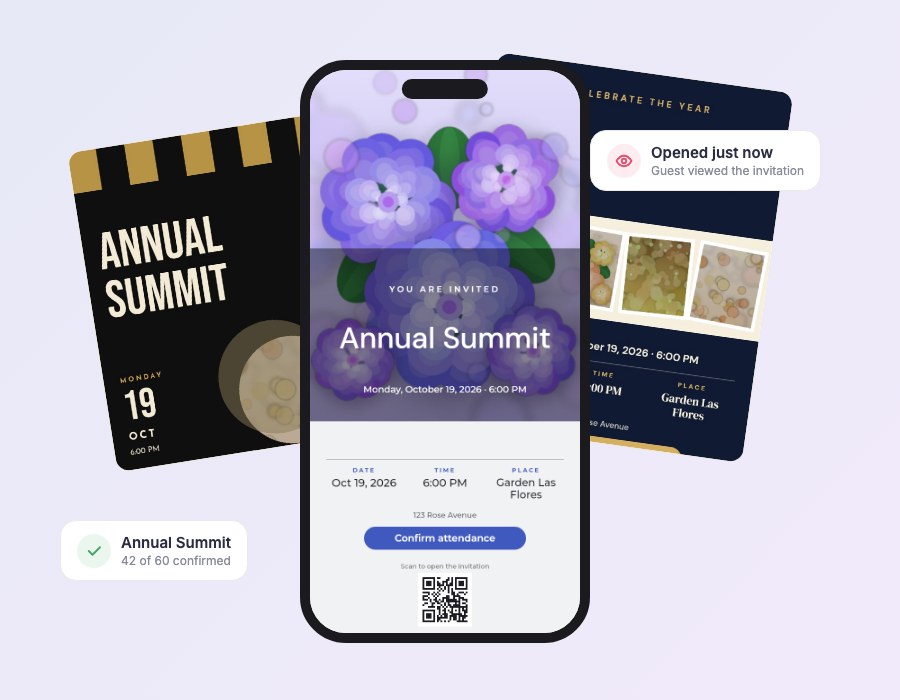
Digital corporate event invitations are online invitations for launches, galas, conferences, client dinners and company parties. Invitees open a branded page with the agenda, venue and an RSVP button, and you see replies in real time.
They are faster to send than printed invitations, easy to update when the agenda changes, and simple to track. With Premium you can remove MyInviteQR branding and use a custom link.
Why teams use digital invitations for events
Polished, trackable and quick to send.
A professional first impression
Clean, modern layouts with your colors and your logo photo.
Know your headcount
See RSVPs in real time so catering and seating are always accurate.
Control the details
Update the agenda or the venue and everyone sees the newest version instantly.
Create an event invitation in four steps
Simple enough to finish in one sitting.
Create your event
Choose the type of event, add the title, date, time and place. Everything saves automatically as a draft.
Pick a template
Browse designer templates for every occasion and preview them on a phone before you decide.
Make it yours
Change text, fonts and colors, drag photos where you want them and add your RSVP button and QR code.
Share and track
Publish, then send one link or QR code by text, email or social media. Watch RSVPs arrive in real time.
Corporate invitation templates
Modern, minimal and editorial layouts.




Everything you need for your corporate invitation
One tool for the design, the link, the QR code and the guest list.
QR code on every invitation
Guests scan the code at your venue, on a save-the-date or on printed cards and land on your invitation instantly.
Free-form invitation editor
Move, resize and rotate any text, photo or shape. Start from a template or build your own layout.
Over 130 color palettes
Change one palette and the whole invitation recolors itself, always keeping the text readable.
Online RSVP and guest list
Guests reply yes, no or maybe with their party size. You see every answer in one clean dashboard.
Know who opened it
See who viewed your invitation and who still needs a nudge, so you can follow up with the right people.
Import your guest list
Upload a CSV or add guests one by one, with groups and a personal link for each guest.
Made for phones
Guests open your invitation in the browser they already use. No app, no account, no friction.
Motion that feels premium
Gentle animated details bring your invitation to life on every screen without slowing it down.
Tips for corporate event invitations
- Lead with the value: who is speaking and what guests will gain.
- Put date, time and venue at the top and the RSVP button right below.
- Add dress code and parking or transit notes.
- Set a firm reply-by date so catering numbers are accurate.
- Use groups to separate VIPs, clients and staff.
Corporate invitation wording ideas
Concise, professional copy you can adapt.
You are invited to the Northwind Annual Summit on Thursday, March 12 at 6:00 PM. Please reply by March 1.
Join us for an evening of networking, food and inspiring talks.
The team is celebrating a great year. Please RSVP to our holiday party.
Built for events of every size
From a 30-person client dinner to a 1,000-guest conference, use groups, a custom link and analytics to run the guest list with confidence.
- Remove MyInviteQR branding with Premium
- Custom link for your event
- Open analytics
- Export attendees to CSV
Keep exploring
More ways to invite, organize and celebrate.
Holiday party invitations
Design free digital holiday party invitations with a QR code and online RSVP. Festive templates for family and office...
ExploreOnline RSVP
Collect RSVPs online with one link or QR code. See who is coming and who opened your invitation. Free to design, pay...
ExploreQR code invitations
Design free QR code invitations guests scan to open your event and RSVP. Add the code to cards, signs and screens....
ExploreFree invitation maker
Use our free online invitation maker to design a digital invitation with photos, colors and a QR code. Free to...
ExploreCorporate invitation questions
Can I remove the MyInviteQR branding?
Yes. The Premium plan removes MyInviteQR branding for a fully white-label look.
How many attendees can I invite?
Essential supports up to 50 guests. Premium supports up to 1,000.
Can I use a QR code for event check-in?
Every invitation has its own QR code that opens the event page. It is ideal for signs and printed materials.
Can I export the guest list?
Yes. Export your guests and their RSVP status to a CSV file at any time.
Can I use my company colors?
Yes. Choose from more than 130 color palettes or pick your own colors in the editor.
Can I send different links to different guests?
Yes. Premium includes individual links for each guest.
Invite your guests in style
Create a professional event invitation and start collecting RSVPs.
Create your invitationDesigning is free. You pay one time, only when you publish. No subscription.