
Free QR code invitations guests scan to open and RSVP
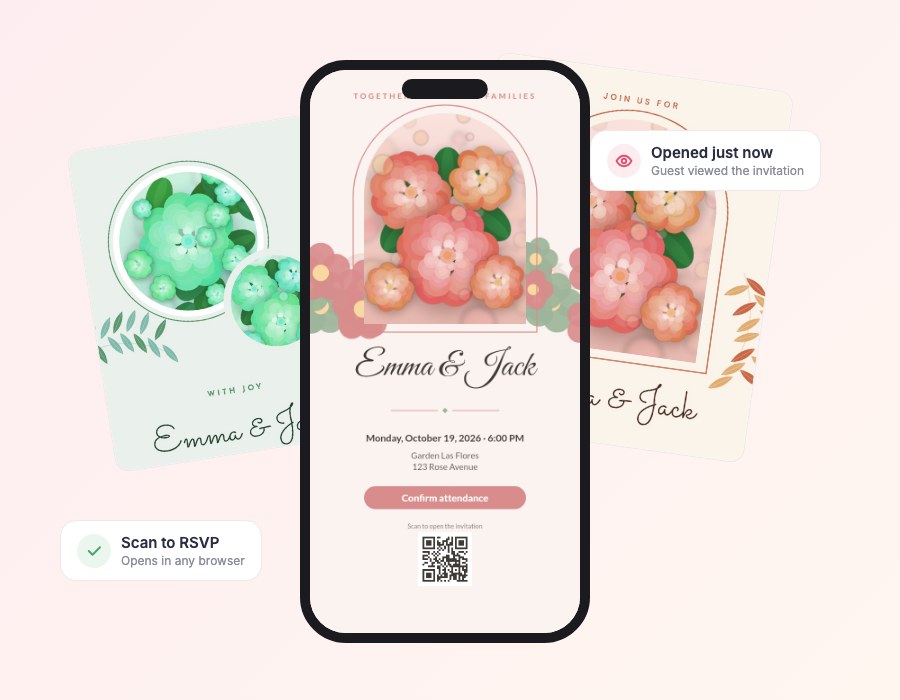
Every MyInviteQR invitation comes with its own QR code. Print it on cards and signs or show it on a screen. One scan takes guests to your event details and the RSVP button.
Free to design and preview. Pay once only when you publish.
What is a QR code invitation?
A QR code invitation is an invitation that includes a scannable code. When a guest points their phone camera at the code, their browser opens your digital invitation with the event details and an RSVP button. No app and no typing are required.
The QR code is especially useful where you cannot click a link: a printed save-the-date, a welcome sign, a menu, a poster or a screen at the venue. MyInviteQR creates the code for you and keeps it working while your event is active.
Why use a QR code on your invitation
The fastest bridge between paper and phone.
One scan, zero typing
Guests point their camera at the code and your invitation opens instantly.
Works with any phone
Every modern iPhone and Android camera reads QR codes with no extra app.
Same link, always current
The QR code never changes. Update your details and everyone sees the latest version.
Create a QR code invitation in four steps
Simple enough to finish in one sitting.
Create your event
Choose the type of event, add the title, date, time and place. Everything saves automatically as a draft.
Pick a template
Browse designer templates for every occasion and preview them on a phone before you decide.
Make it yours
Change text, fonts and colors, drag photos where you want them and add your RSVP button and QR code.
Share and track
Publish, then send one link or QR code by text, email or social media. Watch RSVPs arrive in real time.
Templates with a QR code built in
Each design has room for your QR code.




Everything you need for your qr code invitation
One tool for the design, the link, the QR code and the guest list.
QR code on every invitation
Guests scan the code at your venue, on a save-the-date or on printed cards and land on your invitation instantly.
Free-form invitation editor
Move, resize and rotate any text, photo or shape. Start from a template or build your own layout.
Over 130 color palettes
Change one palette and the whole invitation recolors itself, always keeping the text readable.
Online RSVP and guest list
Guests reply yes, no or maybe with their party size. You see every answer in one clean dashboard.
Know who opened it
See who viewed your invitation and who still needs a nudge, so you can follow up with the right people.
Import your guest list
Upload a CSV or add guests one by one, with groups and a personal link for each guest.
Made for phones
Guests open your invitation in the browser they already use. No app, no account, no friction.
Motion that feels premium
Gentle animated details bring your invitation to life on every screen without slowing it down.
Tips for using QR codes on invitations
- Print the code at least 0.8 inches wide with a clear margin around it.
- Use dark code on a light background for the best scanning.
- Add a short instruction such as Scan to RSVP.
- Test the code with both an iPhone and an Android phone before you print.
- Keep the code away from busy patterns and folds.
Where to place your QR code
A few smart places to put the code so guests always find it.
On printed save-the-dates and invitation cards: “Scan to RSVP.”
On a welcome sign at the venue: “Scan for the schedule and the map.”
On table cards or menus: “Scan to share your photos.”
A QR code you can download and print
Download your QR code as a high-quality image and use it anywhere. It is included with every plan.
- Included in Essential and Premium
- Sharp at any size
- Works with the invitation link
- Add it directly to your design
Keep exploring
More ways to invite, organize and celebrate.
Wedding invitations
Design free digital wedding invitations with a QR code and online RSVP. Share one link with every guest and track...
ExploreBirthday invitations
Design free digital birthday invitations with a QR code in minutes. Kids and adult templates, online RSVP and one...
ExploreOnline RSVP
Collect RSVPs online with one link or QR code. See who is coming and who opened your invitation. Free to design, pay...
ExploreFree invitation maker
Use our free online invitation maker to design a digital invitation with photos, colors and a QR code. Free to...
ExploreQR code invitation questions
What is a QR code invitation?
A QR code invitation includes a scannable code that opens your digital invitation. Guests scan it with their phone camera to see the details and RSVP.
How do I make a QR code invitation?
Create your event in MyInviteQR, pick a template and publish. Your QR code is generated automatically and can be downloaded.
Does the QR code expire?
The code stays valid while your invitation is active. You can add a 6-month extension for $6.99 to keep it working longer.
Can I put the QR code on printed cards?
Yes. Download it and add it to your printed invitations, signs, menus or programs.
What size should a QR code be on an invitation?
At least 0.8 inches (2 cm) wide for close scanning, and larger for signs and posters.
Do guests need a QR scanner app?
No. Modern iPhone and Android cameras scan QR codes automatically.
Create your QR code invitation
Design it, download the code and share it anywhere.
Create your invitationDesigning is free. You pay one time, only when you publish. No subscription.